# Communicating between layers
> How to implement dependency injection to communicate between MVVM layers.
Along with defining clear responsibilities for each component of the architecture,
it's important to consider how the components communicate.
This refers to both the rules that dictate communication,
and the technical implementation of how components communicate.
An app's architecture should answer the following questions:
* Which components are allowed to communicate with which other components
(including components of the same type)?
* What do these components expose as output to each other?
* How is any given layer 'wired up' to another layer?
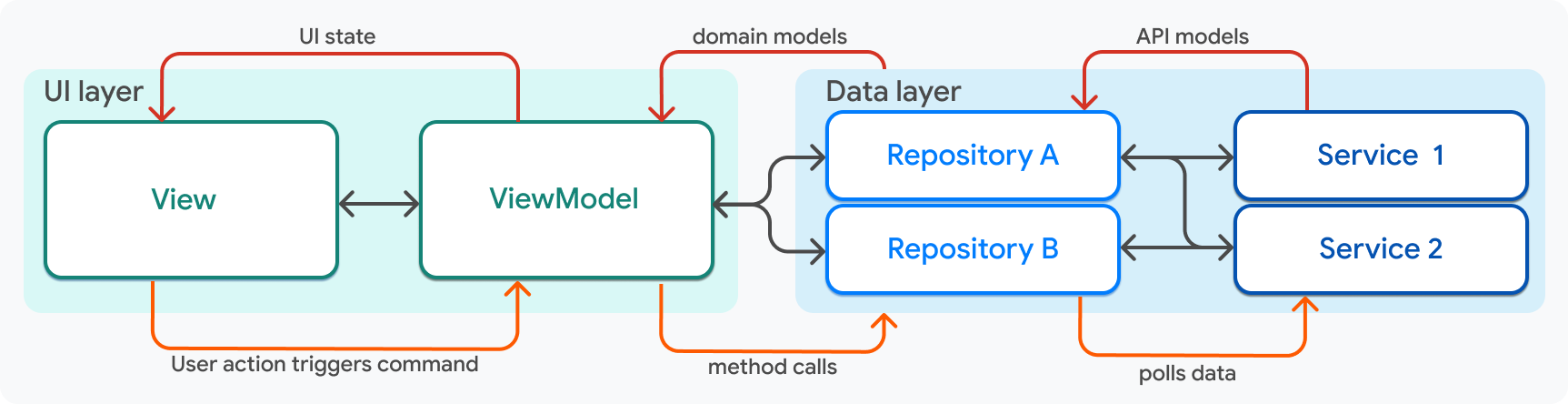
Using this diagram as a guide, the rules of engagement are as follows:
| Component | Rules of engagement |
|------------|-------------------------------------------------------------------------------------------------------------------------------------------------------------------------------------------------------------------------------------------------------------------|
| View | - A view is only aware of exactly one view model, and is never aware of any other layer or component. When created, Flutter passes the view model to the view as an argument, exposing the view model's data and command callbacks to the view.
|
| ViewModel | - A ViewModel belongs to exactly one view, which can see its data, but the model never needs to know that a view exists.
- A view model is aware of one or more repositories, which are passed into the view model's constructor.
|
| Repository | - A repository can be aware of many services, which are passed as arguments into the repository constructor.
- A repository can be used by many view models, but it never needs to be aware of them.
|
| Service | - A service can be used by many repositories, but it never needs to be aware of a repository (or any other object).
|
{:.table .table-striped}
## Dependency injection
This guide has shown how these different components communicate
with each other by using inputs and outputs.
In every case, communication between two layers is facilitated by passing
a component into the constructor methods (of the components that
consume its data), such as a `Service` into a `Repository.`
```dart
class MyRepository {
MyRepository({required MyService myService})
: _myService = myService;
late final MyService _myService;
}
```
One thing that's missing, however, is object creation. Where,
in an application, is the `MyService` instance created so that it can be
passed into `MyRepository`?
This answer to this question involves a
pattern known as [dependency injection][].
In the Compass app, *dependency injection* is handled using
[`package:provider`][]. Based on their experience building Flutter apps,
teams at Google recommend using `package:provider` to implement
dependency injection.
Services and repositories are exposed to the top level of the widget tree of
the Flutter application as `Provider` objects.
```dart title=dependencies.dart
runApp(
MultiProvider(
providers: [
Provider(create: (context) => AuthApiClient()),
Provider(create: (context) => ApiClient()),
Provider(create: (context) => SharedPreferencesService()),
ChangeNotifierProvider(
create: (context) => AuthRepositoryRemote(
authApiClient: context.read(),
apiClient: context.read(),
sharedPreferencesService: context.read(),
) as AuthRepository,
),
Provider(create: (context) =>
DestinationRepositoryRemote(
apiClient: context.read(),
) as DestinationRepository,
),
Provider(create: (context) =>
ContinentRepositoryRemote(
apiClient: context.read(),
) as ContinentRepository,
),
// In the Compass app, additional service and repository providers live here.
],
child: const MainApp(),
),
);
```
Services are exposed only so they can immediately be
injected into repositories via the `BuildContext.read` method from `provider`,
as shown in the preceding snippet.
Repositories are then exposed so that they can be
injected into view models as needed.
Slightly lower in the widget tree, view models that correspond to
a full screen are created in the [`package:go_router`][] configuration,
where provider is again used to inject the necessary repositories.
```dart title=router.dart
// This code was modified for demo purposes.
GoRouter router(
AuthRepository authRepository,
) =>
GoRouter(
initialLocation: Routes.home,
debugLogDiagnostics: true,
redirect: _redirect,
refreshListenable: authRepository,
routes: [
GoRoute(
path: Routes.login,
builder: (context, state) {
return LoginScreen(
viewModel: LoginViewModel(
authRepository: context.read(),
),
);
},
),
GoRoute(
path: Routes.home,
builder: (context, state) {
final viewModel = HomeViewModel(
bookingRepository: context.read(),
);
return HomeScreen(viewModel: viewModel);
},
routes: [
// ...
],
),
],
);
```
Within the view model or repository, the injected component should be private.
For example, the `HomeViewModel` class looks like this:
```dart title=home_viewmodel.dart
class HomeViewModel extends ChangeNotifier {
HomeViewModel({
required BookingRepository bookingRepository,
required UserRepository userRepository,
}) : _bookingRepository = bookingRepository,
_userRepository = userRepository;
final BookingRepository _bookingRepository;
final UserRepository _userRepository;
// ...
}
```
Private methods prevent the view, which has access to the view model, from
calling methods on the repository directly.
This concludes the code walkthrough of the Compass app. This page only walked
through the architecture-related code, but it doesn't tell the whole story. Most
utility code, widget code, and UI styling was ignored. Browse the code in
the [Compass app repository][] for a complete
example of a robust Flutter application built following these principles.
[`package:provider`]: https://pub.dev/packages/provider
[`package:go_router`]: https://pub.dev/packages/go_router
[Compass app repository]: https://github.com/flutter/samples/tree/main/compass_app
[dependency injection]: https://en.wikipedia.org/wiki/Dependency_injection
## Feedback
As this section of the website is evolving,
we [welcome your feedback][]!
[welcome your feedback]: https://google.qualtrics.com/jfe/form/SV_4T0XuR9Ts29acw6?page="case-study/dependency-injection"