# AndroidX migration
> How to migrate existing Flutter projects to AndroidX.
:::important
These breaking change docs are accurate, as of the release
under which they are published. Over time, the
workarounds described here might become inaccurate.
We don't, in general, keep these breaking change docs up
to date as of each release.
The [breaking change index file](/release/breaking-changes)
lists the docs created for each release.
:::
:::note
You might be directed to this page if Flutter detects
that your project doesn't use AndroidX.
:::
[AndroidX][] is a major improvement
to the original Android Support Library.
It provides the `androidx.*` package libraries,
unbundled from the platform API. This means that it
offers backward compatibility and is updated
more frequently than the Android platform.
[AndroidX]: https://developer.android.com/jetpack/androidx
## Common Questions
### How do I migrate my existing app, plugin or host-editable module project to AndroidX?
_You will need Android Studio 3.2 or higher.
If you don't have it installed,
you can download the latest version from the
[Android Studio][] site_.
1. Open Android Studio.
2. Select **Open an existing Android Studio Project**.
3. Open the `android` directory within your app.
4. Wait until the project has been synced successfully.
(This happens automatically once you open the project,
but if it doesn't, select **Sync Project with Gradle Files**
from the **File** menu).
5. Select **Migrate to AndroidX** from the Refactor menu.
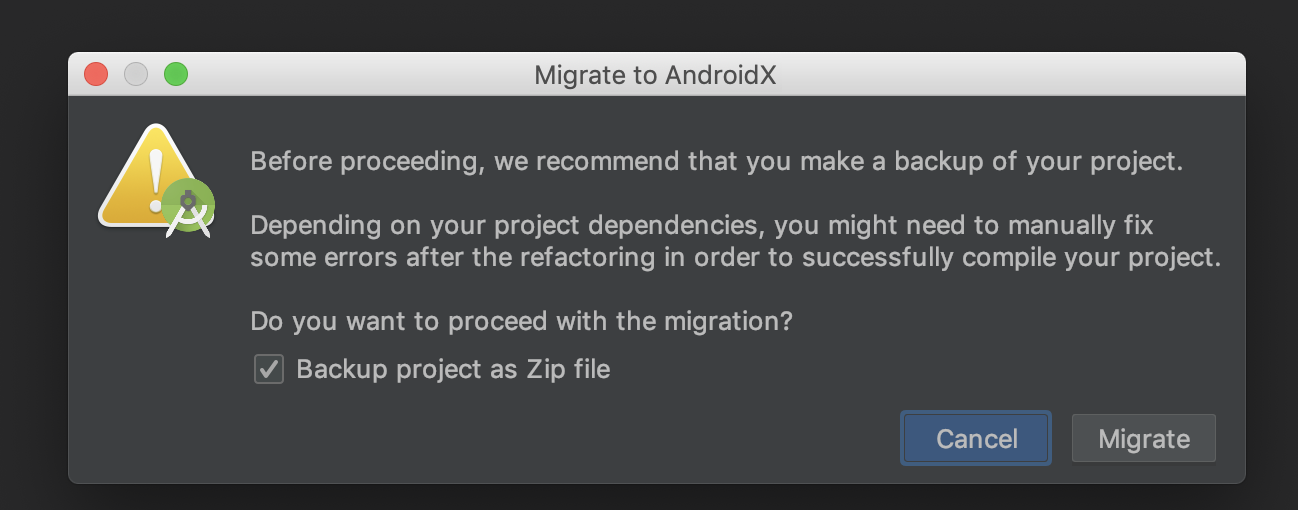
6. If you're asked to back up the project before proceeding,
check **Backup project as Zip file**, then click **Migrate**.
Lastly, save the zip file in your location of preference.
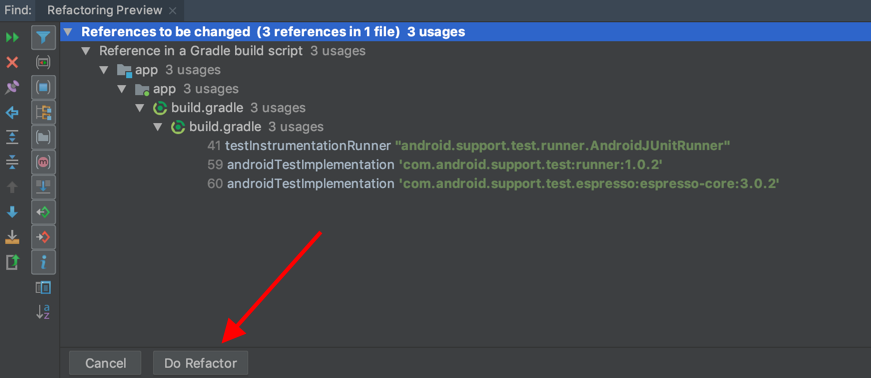
 7. The refactoring preview shows the list of changes.
Finally, click **Do Refactor**:
7. The refactoring preview shows the list of changes.
Finally, click **Do Refactor**:
 8. That is it! You successfully migrated your project to AndroidX.
Finally, if you migrated a plugin,
publish the new AndroidX version to pub and update
your `CHANGELOG.md` to indicate that this new version
is compatible with AndroidX.
[Android Studio]: https://developer.android.com/studio
### What if I can't use Android Studio?
You can create a new project using the Flutter tool
and then move the Dart code and
assets to the new project.
To create a new project run:
```console
flutter create -t
```
### Add to app
If your Flutter project is a module type for adding
to an existing Android app, and contains a
`.android` directory, add the following line to `pubspec.yaml`:
```yaml
module:
...
androidX: true # Add this line.
```
Finally, run `flutter clean`.
If your module contains an `android` directory instead,
then follow the steps in previous section.
### How do I know if my project is using AndroidX?
Starting from Flutter v1.12.13, new projects created with
`flutter create -t `
use AndroidX by default.
Projects created prior to this Flutter version
mustn't depend on any [old build artifact][] or
[old Support Library class][].
[old build artifact]: https://developer.android.com/jetpack/androidx/migrate/artifact-mappings
[old Support Library class]: https://developer.android.com/jetpack/androidx/migrate/class-mappings
In an app or module project,
the file `android/gradle.properties`
or `.android/gradle.properties`
must contain:
```properties
android.useAndroidX=true
android.enableJetifier=true
```
### What if I don't migrate my app or module to AndroidX?
Your app might continue to work. However,
combining AndroidX and Support artifacts
is generally not recommended because it can
result in dependency conflicts or
other kind of Gradle failures.
As a result, as more plugins migrate to AndroidX,
plugins depending on Android core libraries are likely
to cause build failures.
### What if my app is migrated to AndroidX, but not all of the plugins I use?
The Flutter tool uses Jetifier to automatically
migrate Flutter plugins using the Support Library
to AndroidX, so you can use the same plugins even
if they haven't been migrated to AndroidX yet.
### I'm having issues migrating to AndroidX
[Open an issue on GitHub][] and add `[androidx-migration]`
to the title of the issue.
[Open an issue on GitHub]: https://github.com/flutter/flutter/issues/new/choose
8. That is it! You successfully migrated your project to AndroidX.
Finally, if you migrated a plugin,
publish the new AndroidX version to pub and update
your `CHANGELOG.md` to indicate that this new version
is compatible with AndroidX.
[Android Studio]: https://developer.android.com/studio
### What if I can't use Android Studio?
You can create a new project using the Flutter tool
and then move the Dart code and
assets to the new project.
To create a new project run:
```console
flutter create -t
```
### Add to app
If your Flutter project is a module type for adding
to an existing Android app, and contains a
`.android` directory, add the following line to `pubspec.yaml`:
```yaml
module:
...
androidX: true # Add this line.
```
Finally, run `flutter clean`.
If your module contains an `android` directory instead,
then follow the steps in previous section.
### How do I know if my project is using AndroidX?
Starting from Flutter v1.12.13, new projects created with
`flutter create -t `
use AndroidX by default.
Projects created prior to this Flutter version
mustn't depend on any [old build artifact][] or
[old Support Library class][].
[old build artifact]: https://developer.android.com/jetpack/androidx/migrate/artifact-mappings
[old Support Library class]: https://developer.android.com/jetpack/androidx/migrate/class-mappings
In an app or module project,
the file `android/gradle.properties`
or `.android/gradle.properties`
must contain:
```properties
android.useAndroidX=true
android.enableJetifier=true
```
### What if I don't migrate my app or module to AndroidX?
Your app might continue to work. However,
combining AndroidX and Support artifacts
is generally not recommended because it can
result in dependency conflicts or
other kind of Gradle failures.
As a result, as more plugins migrate to AndroidX,
plugins depending on Android core libraries are likely
to cause build failures.
### What if my app is migrated to AndroidX, but not all of the plugins I use?
The Flutter tool uses Jetifier to automatically
migrate Flutter plugins using the Support Library
to AndroidX, so you can use the same plugins even
if they haven't been migrated to AndroidX yet.
### I'm having issues migrating to AndroidX
[Open an issue on GitHub][] and add `[androidx-migration]`
to the title of the issue.
[Open an issue on GitHub]: https://github.com/flutter/flutter/issues/new/choose