Create widgets
Learn about stateless widgets and how to build your own.
Learn to create custom widgets and use the most common SDK widgets like Container, Center, and Text.
What you'll accomplish
Steps
1
Before you start
Before you start
This app relies on a bit of game logic that isn't UI-related, and thus is outside the scope of this tutorial. Before you move on, you need to add this logic to your app.
-
Download the following Dart file and save it as
lib/game.dartin your project directory.game.dartdart/// Game logic and supporting types for Birdle, /// a five-letter word-guessing game similar to Wordle. /// /// Defines the [Game] state machine and the /// [Word], [Letter], and [HitType] data model used to /// represent guesses and their evaluation against a hidden word. library; import 'dart:collection'; import 'dart:math'; /// The result of evaluating a [Letter] of a guess against the hidden word. enum HitType { /// The letter hasn't yet been evaluated. none, /// The letter matches the hidden word's letter at the same position. hit, /// The letter is in the hidden word, but at a different position. partial, /// The letter doesn't appear in the hidden word. miss, } /// A single character paired with its [HitType] against the hidden word. typedef Letter = ({String char, HitType type}); /// Every word that can be legally entered as a guess. const List<String> allLegalGuesses = [...legalWords, ...legalGuesses]; /// Words that can be chosen as the hidden word. const List<String> legalWords = ['aback', 'abase', 'abate', 'abbey', 'abbot']; /// Additional words accepted as guesses beyond those in [legalWords]. const List<String> legalGuesses = [ 'aback', 'abase', 'abate', 'abbey', 'abbot', 'abhor', 'abide', 'abled', 'abode', 'abort', ]; /// Game state of a single round of Birdle, /// a five-letter word-guessing game similar to Wordle. /// /// Exposes the state and methods a UI needs to /// evaluate guesses and track progress, /// but doesn't advance play on its own. /// /// Clients drive each round by calling [guess] to submit an attempt and /// [resetGame] to start over. class Game { /// The default maximum number of guesses allowed in a [Game]. static const int defaultMaxGuesses = 5; /// Creates a new game with [maxGuesses] guesses allowed. /// /// If [seed] is provided, the hidden word is /// chosen deterministically from [legalWords], /// otherwise it is selected at random. Game({this.maxGuesses = defaultMaxGuesses, this.seed}) : _wordToGuess = _generateInitialWord(seed), _guesses = List<Word>.filled(maxGuesses, Word.empty()); /// The maximum number of guesses allowed in this game. final int maxGuesses; /// The seed used to choose the hidden word, /// or `null` if it was selected at random. final int? seed; /// The current hidden word, exposed publicly through [hiddenWord]. Word _wordToGuess; /// Backing storage for [guesses]. /// /// Holds every guess slot in order, /// with unfilled slots represented by empty [Word]s. List<Word> _guesses; /// The word the player is trying to guess. Word get hiddenWord => _wordToGuess; /// An unmodifiable view of every guess slot, including those still empty. UnmodifiableListView<Word> get guesses => UnmodifiableListView(_guesses); /// The most recently submitted guess, /// or an empty [Word] if no guesses have been made. Word get previousGuess { final index = _guesses.lastIndexWhere((word) => word.isNotEmpty); return index == -1 ? Word.empty() : _guesses[index]; } /// The index of the next empty guess slot, or `-1` if every slot is full. int get activeIndex => _guesses.indexWhere((word) => word.isEmpty); /// The number of guesses still available to the player. int get guessesRemaining { if (activeIndex == -1) return 0; return maxGuesses - activeIndex; } /// Whether the most recent guess matches the hidden word. bool get didWin { if (_guesses.first.isEmpty) return false; for (final letter in previousGuess) { if (letter.type != HitType.hit) return false; } return true; } /// Whether all allowed guesses have been used without winning. bool get didLose => guessesRemaining == 0 && !didWin; /// Picks a new hidden word and clears every submitted guess. void resetGame() { _wordToGuess = _generateInitialWord(seed); _guesses = List<Word>.filled(maxGuesses, Word.empty()); } /// Evaluates [guess] against the hidden word, /// records the result in [guesses], and returns it. /// /// For finer control, use [isLegalGuess] to validate input or /// [matchGuessOnly] to evaluate without recording the result. Word guess(String guess) { final result = matchGuessOnly(guess); addGuessToList(result); return result; } /// Whether [guess] is a legal word to guess. /// /// UIs can call this method before [guess] to /// show players a message when they enter an invalid word. bool isLegalGuess(String guess) => Word.fromString(guess).isLegalGuess; /// Evaluates [guess] against the hidden word without advancing the game. Word matchGuessOnly(String guess) => Word.fromString(guess).evaluateGuess(_wordToGuess); /// Stores [guess] in the next empty slot of [guesses]. void addGuessToList(Word guess) { final guessIndex = activeIndex; if (guessIndex == -1) { throw StateError('No guesses remaining.'); } _guesses[guessIndex] = guess; } /// Returns the starting hidden word for a new round. /// /// Picks a deterministic word from [legalWords] when [seed] is provided, /// or one at random otherwise. static Word _generateInitialWord(int? seed) => seed == null ? Word.random() : Word.fromSeed(seed); } /// A five-letter word made up of [Letter]s, each tracking its [HitType]. class Word with IterableMixin<Letter> { /// Creates a word backed by the specified list of [Letter]s. Word(this._letters); /// Creates a word with five blank letters of [HitType.none]. factory Word.empty() => Word(List<Letter>.filled(5, (char: '', type: HitType.none))); /// Creates a [Word] from [guess]. /// /// Each character is lowercased, /// every [Letter] starts as [HitType.none]. factory Word.fromString(String guess) { if (guess.length != 5) { throw ArgumentError.value( guess, 'guess', 'Must be exactly 5 characters long.', ); } final letters = guess .toLowerCase() .split('') .map((char) => (char: char, type: HitType.none)) .toList(); return Word(letters); } /// Creates a word chosen at random from [legalWords]. factory Word.random() { final random = Random(); final nextWord = legalWords[random.nextInt(legalWords.length)]; return Word.fromString(nextWord); } /// Creates a word chosen from [legalWords] using [seed] as an index. factory Word.fromSeed(int seed) => Word.fromString(legalWords[seed % legalWords.length]); /// An unmodifiable list of [Letter]s that make up this word. final List<Letter> _letters; @override Iterator<Letter> get iterator => _letters.iterator; /// Whether every [Letter] in this word has no character. @override bool get isEmpty => every((letter) => letter.char.isEmpty); @override int get length => _letters.length; /// The [Letter] at index [i] in word. Letter operator [](int i) => _letters[i]; @override String toString() => _letters.map((letter) => letter.char).join().trim(); /// Returns a multi-line string showing each [Letter] alongside its [HitType]. /// /// Used to play the game from the command line. String toStringVerbose() => _letters .map((letter) => '${letter.char} - ${letter.type.name}') .join('\n'); } /// Validation and guess-evaluation logic on [Word]. extension WordUtils on Word { /// Whether this word appears in [allLegalGuesses]. bool get isLegalGuess => allLegalGuesses.contains(toString()); /// Compares this [Word] against the specified [hiddenWord] /// and returns a new [Word] with the same letters, /// but where each [Letter] has new a [HitType] of /// [HitType.hit], [HitType.partial], or [HitType.miss]. Word evaluateGuess(Word hiddenWord) { assert(isLegalGuess); final result = List<Letter>.filled(length, (char: '', type: HitType.none)); // Counts hidden-word letters that can still be claimed as partial matches. final unmatchedHiddenLetterCounts = <String, int>{}; // Reserve exact matches before scoring partial matches. for (var i = 0; i < length; i++) { final guessChar = this[i].char; final hiddenChar = hiddenWord[i].char; if (guessChar == hiddenChar) { result[i] = (char: guessChar, type: HitType.hit); } else { // Track non-hit hidden letters for the partial-match pass. final unmatchedCount = unmatchedHiddenLetterCounts[hiddenChar] ?? 0; unmatchedHiddenLetterCounts[hiddenChar] = unmatchedCount + 1; } } // Spend each remaining hidden letter only once for partial matches. for (var i = 0; i < length; i++) { if (result[i].type == HitType.hit) continue; final guessChar = this[i].char; final unmatchedCount = unmatchedHiddenLetterCounts[guessChar] ?? 0; final isPartial = unmatchedCount > 0; if (isPartial) { // Use one available hidden letter for this partial match. unmatchedHiddenLetterCounts[guessChar] = unmatchedCount - 1; } result[i] = ( char: guessChar, type: isPartial ? HitType.partial : HitType.miss, ); } return Word(result); } } -
To enable access to the types defined in the
game.dartlibrary, add an import to it from yourlib/main.dartfile:main.dartdartimport 'package:material_ui/material_ui.dart'; import 'game.dart';
2
Anatomy of a stateless widget
Anatomy of a stateless widget
A Widget is a Dart class that extends one of the Flutter widget classes,
in this case StatelessWidget.
Open your main.dart file and add this code below the MainApp class,
which defines a new widget called Tile.
class Tile extends StatelessWidget {
const Tile(this.letter, this.hitType, {super.key});
final String letter;
final HitType hitType;
@override
Widget build(BuildContext context) {
return Container();
}
}
Constructor
#
The Tile class has a constructor that defines
what data needs to be passed into the widget to render the widget.
In this case, the constructor accepts two parameters:
- A
Stringrepresenting the guessed letter of the tile. -
A
HitTypeenum value represent the guess result and used to determine the color of the tile. For example,HitType.hitresults in a green tile.
Passing data into widget constructors is at the core of making widgets reusable.
Build method
#
Finally, there's the all important build method,
which must be defined on every widget,
and will always return another widget.
class Tile extends StatelessWidget {
const Tile(this.letter, this.hitType, {super.key});
final String letter;
final HitType hitType;
@override
Widget build(BuildContext context) {
// TODO: Replace Container with widgets.
return Container();
}
}
3
Use the custom widget
Use the custom widget
When the app is finished,
there will be 25 instances of this widget on the screen.
For now, display just a single tile in the center of the screen
so you can see styling updates as you make them.
In the MainApp.build method,
replace the Text widget with your Tile widget:
class MainApp extends StatelessWidget {
const MainApp({super.key});
@override
Widget build(BuildContext context) {
return const MaterialApp(
home: Scaffold(
body: Center(
child: Tile('A', HitType.hit), // NEW
),
),
);
}
}
At the moment, your app appears blank
because the Tile widget returns an empty Container,
which doesn't render anything by default.
4
The Container widget
The Container widget
The Tile widget consists of three of the most common core widgets:
Container, Center, and Text.
Container
is a convenience widget that wraps several core styling widgets,
such as Padding,
ColoredBox,
SizedBox, and
DecoratedBox.
Because the finished UI contains 25 Tile widgets in neat columns and rows,
it should have an explicit size.
Set the width and height properties on the Container.
(You could also do this with a SizedBox widget, but you'll use
more properties of the Container next.)
class Tile extends StatelessWidget {
const Tile(this.letter, this.hitType, {super.key});
final String letter;
final HitType hitType;
@override
Widget build(BuildContext context) {
// NEW
return Container(
width: 60,
height: 60,
// TODO: Add needed widgets
);
}
}
5
BoxDecoration
BoxDecoration
Next, add a Border
to the box with the following code:
class Tile extends StatelessWidget {
const Tile(this.letter, this.hitType, {super.key});
final String letter;
final HitType hitType;
@override
Widget build(BuildContext context) {
// NEW
return Container(
width: 60,
height: 60,
decoration: BoxDecoration(
border: Border.all(color: Colors.grey.shade300),
// TODO: add background color
),
);
}
}
BoxDecoration is an object that knows how to
add any number of decorations to a widget, from
background color to borders to box shadows and more.
In this case, you added a border.
When you hot reload,
a lightly colored border appears around the tile.
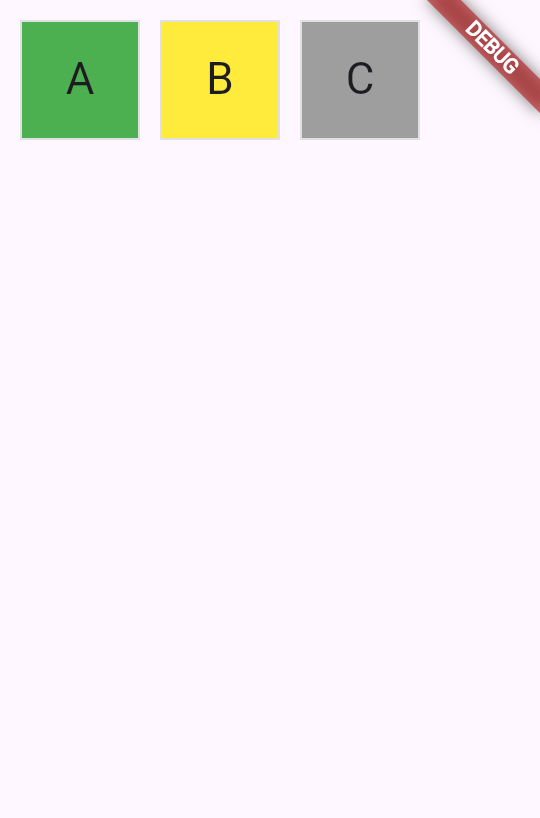
When this game is complete, the color of the tile will depend on the user's guess. The tile will be green when the user has guessed correctly, yellow when the letter is correct but the position is incorrect, and gray if the guess is wrong in both respects.
The following figure shows all three possibilities.
To achieve this in UI, use a switch expression
to
set the color of the BoxDecoration.
class Tile extends StatelessWidget {
const Tile(this.letter, this.hitType, {super.key});
final String letter;
final HitType hitType;
@override
Widget build(BuildContext context) {
return Container(
width: 60,
height: 60,
decoration: BoxDecoration(
border: Border.all(color: Colors.grey.shade300),
color: switch (hitType) {
HitType.hit => Colors.green,
HitType.partial => Colors.yellow,
HitType.miss => Colors.grey,
_ => Colors.white,
},
// TODO: add children
),
);
}
}
6
Child widgets
Child widgets
Finally, add the Center and Text widgets to the Container.child
property.
Most widgets in the Flutter SDK have a child or children property that's
meant to be passed a widget or a list of widgets, respectively.
It's the best practice to use the same naming convention in
your own custom widgets.
class Tile extends StatelessWidget {
const Tile(this.letter, this.hitType, {super.key});
final String letter;
final HitType hitType;
@override
Widget build(BuildContext context) {
return Container(
width: 60,
height: 60,
decoration: BoxDecoration(
border: Border.all(color: Colors.grey.shade300),
color: switch (hitType) {
HitType.hit => Colors.green,
HitType.partial => Colors.yellow,
HitType.miss => Colors.grey,
_ => Colors.white,
},
),
child: Center(
child: Text(
letter.toUpperCase(),
style: Theme.of(context).textTheme.titleLarge,
),
),
);
}
}
Hot reload, and a single green tile containing the letter A appears in the center of your app. To test different colors, try replacing the Tile widget in MainApp with one of the following examples, then hot reload:
// main.dart line ~16
// green
Tile('A', HitType.hit);
// grey
Tile('A', HitType.miss);
// yellow
Tile('A', HitType.partial);
Soon, this small box will be one of many widgets on the screen. In the next lesson, you'll build the full 5x5 grid of tiles for the game board.
7
Review
Review
What you accomplished
Here's a summary of what you built and learned in this lesson.Built a custom StatelessWidget
You created a new Tile widget by extending StatelessWidget. Every widget has a constructor to accept data and a
build method that returns other widgets. This pattern is fundamental to building user interfaces with Flutter.
Made widgets reusable with constructor parameters
By accepting letter and hitType as constructor parameters, your Tile
widget can display different content and colors. Passing data through constructors is how you can create flexible, reusable components.
Styled widgets using Container and BoxDecoration
You used Container to set the widget's size and BoxDecoration to add borders and background colors. Then to conditional style the tile's color, you used a switch expression on the
hitType value.
8
Test yourself
Test yourself
Widget Fundamentals Quiz
1 / 2build method return?
-
A String describing the widget.
Not quite.
The
buildmethod returns a widget, not a String. -
Another widget.
That's right!
The
buildmethod always returns another widget, which forms part of the widget tree. -
A boolean indicating success or failure.
Not quite.
Widgets don't indicate success; they return other widgets to be rendered.
-
Null if there's nothing to display.
Not quite.
The
buildmethod cannot return null; it must return a valid widget.
-
ThemeData
Not quite.
ThemeData is for app-wide styling, not individual container decorations.
-
TextStyle
Not quite.
TextStyle is for text formatting, not container decorations.
-
BoxDecoration
That's right!
BoxDecoration can add borders, background colors, gradients, shadows, and more to a Container.
-
EdgeInsets
Not quite.
EdgeInsets is for specifying padding or margin, not visual decorations.
Unless stated otherwise, the documentation on this site reflects Flutter 3.47. Page last updated on 2026-09-29. View source or report an issue.