Tool calls (aka function calls)
Learn how to implement tool calling, manage agentic loops, and incorporate human-in-the-loop interactions using the Firebase AI Logic SDK.
While it's true that LLMs are trained essentially on the entire internet, they don't know everything. They know what was on the public internet the day they were trained, but they don't know anything more recent than that. They don't know anything that's private to you or your organization. And even things they do know can easily get tangled up with other things they know.
For those scenarios, and many others, we often provide an LLM with one or more tools.
Tool defined
#A tool is a name, a description and a JSON schema for the format of the input data when the LLM "calls" the tool. For example, if we prompt the LLM to "Reduce the carbs in Grandma's All America Breakfast recipe", it won't know what grandma's recipe is unless we give it a "lookupRecipe" tool that takes a query string we can use to look up the recipe.
Conceptually, a tool is something we give the LLM to call when it needs that data or service. The way an LLM calls a tool is by responding to the app's request with a specially formatted message that means "tool call". A tool call message includes the name and JSON arguments for the tool. The app handles the tool call and bundles the result in another LLM request, to which the LLM then responds.
This can go on for a while. An app can configure a model instance with any number of tools (although the LLM does better with a smaller set of targeted tools that don't overlap in functionality). The LLM can bundle up any number of tool calls in its response and can take any number of tool results in a request. The LLM consolidates multiple round-trips for prompts and tool call results via a stack of messages that form a history of request/response pairs.
When it's done with the tool calls, the LLM returns its final response, for example "Here's a version of Grandma's All American Breakfast recipe that's high on protein and low on carbs…".
Gemini functions
#In the Firebase AI Logic SDK, a tool is called a "function", but it's the same thing. In the sample, the clue solver model is configured with a function to look up word details. If the LLM wants details about a word to help with the solving process, calling the function provides it with data from the Free Dictionary API:
[
  {
    "word": "tool",
    "phonetic": "/tuːl/",
    "phonetics": [
      {
        "text": "/tuːl/",
        "audio": "https://api.dictionaryapi.dev/media/pronunciations/en/tool-uk.mp3",
        "sourceUrl": "https://commons.wikimedia.org/w/index.php?curid=94709459",
        "license": {
          "name": "BY-SA 4.0",
          "url": "https://creativecommons.org/licenses/by-sa/4.0"
        }
      }
    ],
    "meanings": [
      {
        "partOfSpeech": "noun",
        "definitions": [
          {
            "definition": "A mechanical device intended to make a task easier.",
            "synonyms": [],
            "antonyms": [],
            "example": "Hand me that tool, would you?   I don't have the right tools to start fiddling around with the engine."
          },
...
The app has a Dart function that does the look up:
// Look up the metadata for a word in the dictionary API.
Future<Map<String, dynamic>> _getWordMetadataFromApi(String word) async {
final url = Uri.parse(
'https://api.dictionaryapi.dev/api/v2/entries/en/${Uri.encodeComponent(word)}',
);
final response = await http.get(url);
return response.statusCode == 200
? {'result': jsonDecode(response.body)}
: {'error': 'Could not find a definition for "$word".'};
}
The model is configured with the look up function as part of initialization:
// The model for solving clues.
_clueSolverModel = FirebaseAI.googleAI().generativeModel(
  model: 'gemini-2.5-flash',
  systemInstruction: Content.text(clueSolverSystemInstruction),
  tools: [
    Tool.functionDeclarations([
      FunctionDeclaration(
        'getWordMetadata',
        'Gets grammatical metadata for a word, like its part of speech. '
        'Best used to verify a candidate answer against a clue that implies a '
        'grammatical constraint.',
        parameters: {
           'word': Schema(SchemaType.string, description: 'The word to look up.'),
         },
       ),
    ]),
  ],
);
For reliability, it's also a good idea to list the tools in the system instruction:
static String get clueSolverSystemInstruction =>
'''
You are an expert crossword puzzle solver.
...
### Tool: `getWordMetadata`
You have a tool to get grammatical information about a word.
**When to use:**
- This tool is most helpful as a verification step after you have a likely answer.
- Consider using this tool when a clue contains a grammatical hint that could be ambiguous.
- **Good candidates for verification:**
- Clues that seem to be verbs (e.g., "To run," "Waving").
- Clues that are adverbs (e.g., "Happily," "Quickly").
- Clues that specify a plural form.
- **Try to avoid using the tool for:**
- Simple definitions (e.g., "A small dog").
- Fill-in-the-blank clues (e.g., "___ and flow").
- Proper nouns (e.g., "Capital of France").
**Function signature:**
```json
${jsonEncode(_getWordMetadataFunction.toJson())}
```
''';
When the app makes a request, the model now has a tool to use when it decides that it will be helpful. To support tool calls, we need to implement an agentic loop.
The Agentic Loop
#
An LLM is functionally stateless, which means that you have to give it all of
the data it needs with every request. For a request that's just the prompt and
any files you want to send along, the Firebase AI Logic SDK exposes the
generateContent method on your model instance.
However, tool calling requires a history of messages that form the initial prompt, as well as the response/request pairs that make up tool calls and tool results. To support this Firebase Logic AI provides a "chat" object to gather the history. We use it to build the agentic loop:
- Start a chat to hold the message history across multiple request/response pairs
- Gather the tool results for any tool calls it provides
- Bundle the tool results into a new request
- Loop until the model provides a response without tool calls
- Return the text accumulated across all responses
Here's that algorithm expressed as an extension method on the GenerativeModel class so we can call it just like we call
generateContent:
extension on GenerativeModel {
Future<String> generateContentWithFunctions({
required String prompt,
required Future<Map<String, dynamic>> Function(FunctionCall) onFunctionCall,
}) async {
// Use a chat session to support multiple request/response pairs, which is
// needed to support function calls.
final chat = startChat();
final buffer = StringBuffer();
var response = await chat.sendMessage(Content.text(prompt));
while (true) {
// Append the response text to the buffer.
buffer.write(response.text ?? '');
// If no function calls were collected, we're done
if (response.functionCalls.isEmpty) break;
// Append a newline to separate responses.
buffer.write('\n');
// Execute all function calls
final functionResponses = <FunctionResponse>[];
for (final functionCall in response.functionCalls) {
try {
functionResponses.add(
FunctionResponse(
functionCall.name,
await onFunctionCall(functionCall),
),
);
} catch (ex) {
functionResponses.add(
FunctionResponse(functionCall.name, {'error': ex.toString()}),
);
}
}
// Get the next response stream with function results
response = await chat.sendMessage(
Content.functionResponses(functionResponses),
);
}
return buffer.toString();
}
}
This method takes a prompt and a callback for handling the specific tool calls, which the sample calls to handle the word lookup function:
await _clueSolverModel.generateContentWithFunctions(
  prompt: getSolverPrompt(clue, length, pattern),
  onFunctionCall: (functionCall) async => switch (functionCall.name) {
    'getWordMetadata' => await _getWordMetadataFromApi(
      functionCall.args['word'] as String,
    ),
    _ => throw Exception('Unknown function call: ${functionCall.name}'),
  },
);
Structured output makes an LLM useful to program against but it's the tools that turn an LLM into an "agent" (more on this in the Mode of interaction section).
Structured output and tool calls
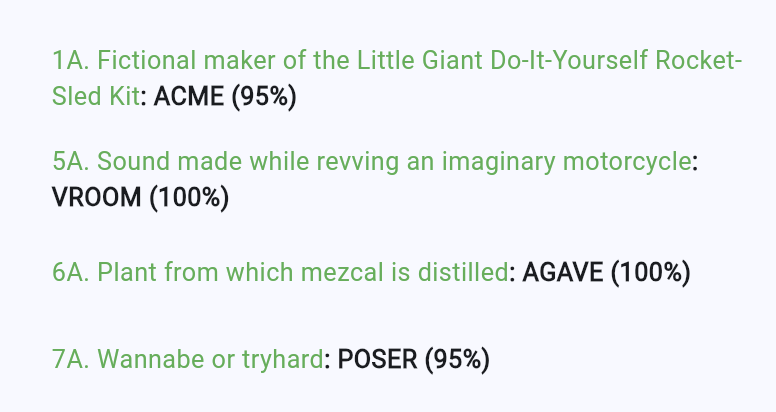
#Combining structured output and tool calls produce a powerful combination. In the sample, the clue solver has a tool to look up word details. It's also asked to return JSON that bundles the solution with a confidence score, both of which are shown in the app's task list:
Unfortunately, as of this writing, combining structured output and functions when using the Firebase AI Logic SDK produces an exception:
Function calling with a response mime type: 'application/json' is unsupported
As a (hopefully temporary) work-around to this issue, the sample removes the
structured output configuration, instead using a tool called returnResult
to
simulate structured output:
 // The model for solving clues.
_clueSolverModel = FirebaseAI.googleAI().generativeModel(
  model: 'gemini-2.5-flash',
  systemInstruction: Content.text(clueSolverSystemInstruction),
  tools: [
    Tool.functionDeclarations([
      ...,
      FunctionDeclaration(
        'returnResult',
        'Returns the final result of the clue solving process.',
        parameters: {
        'answer': Schema(
          SchemaType.string,
          description: 'The answer to the clue.',
        ),
        'confidence': Schema(
          SchemaType.number,
          description: 'The confidence score in the answer from 0.0 to 1.0.',
          ),
        },
      ),
    ]),
  ],
);
The returnResult method is also mentioned in the system instruction:
static String get clueSolverSystemInstruction =>
'''
You are an expert crossword puzzle solver.
...
### Tool: `returnResult`
You have a tool to return the final result of the clue solving process.
**When to use:**
- Use this tool when you have a final answer and confidence score to return. You
must use this tool exactly once, and only once, to return the final result.
**Function signature:**
```json
${jsonEncode(_returnResultFunction.toJson())}
```
''';
When the model calls returnResult, the sample caches the result, which the
solveClue looks up after calling generateContentWithFunctions:
// Buffer for the result of the clue solving process.
final _returnResult = <String, dynamic>{};
// Cache the return result of the clue solving process via a function call.
// This is how we get JSON responses from the model with functions, since the
// model cannot return JSON directly when tools are used.
Map<String, dynamic> _cacheReturnResult(Map<String, dynamic> returnResult) {
assert(_returnResult.isEmpty);
_returnResult.addAll(returnResult);
return {'status': 'success'};
}
Future<ClueAnswer?> solveClue(Clue clue, int length, String pattern) async {
// Clear the return result cache; this is where the result will be stored.
_returnResult.clear();
// Generate JSON response with functions and schema.
await _clueSolverModel.generateContentWithFunctions(
prompt: getSolverPrompt(clue, length, pattern),
onFunctionCall: (functionCall) async => switch (functionCall.name) {
'getWordMetadata' => ...,
'returnResult' => _cacheReturnResult(functionCall.args),
_ => throw Exception('Unknown function call: ${functionCall.name}'),
},
);
// Use the structured output that the LLM has called function with
assert(_returnResult.isNotEmpty);
return ClueAnswer(
answer: _returnResult['answer'] as String,
confidence: (_returnResult['confidence'] as num).toDouble(),
);
}
We have to work a little harder to get the combo of structured output and tool calls using Firebase AI Logic, but the results are worth it!
Human in the loop
#So far, we've seen tools used for gathering data and formatting output. We can also use them to get a human involved.
As an example, sometimes when the sample will pass in a pattern the solution
should take – like "_R_Y" – the model wants to suggest an answer that doesn't
fit this pattern – like "RENT". A conflict like this is a good time to ask for
help from the user: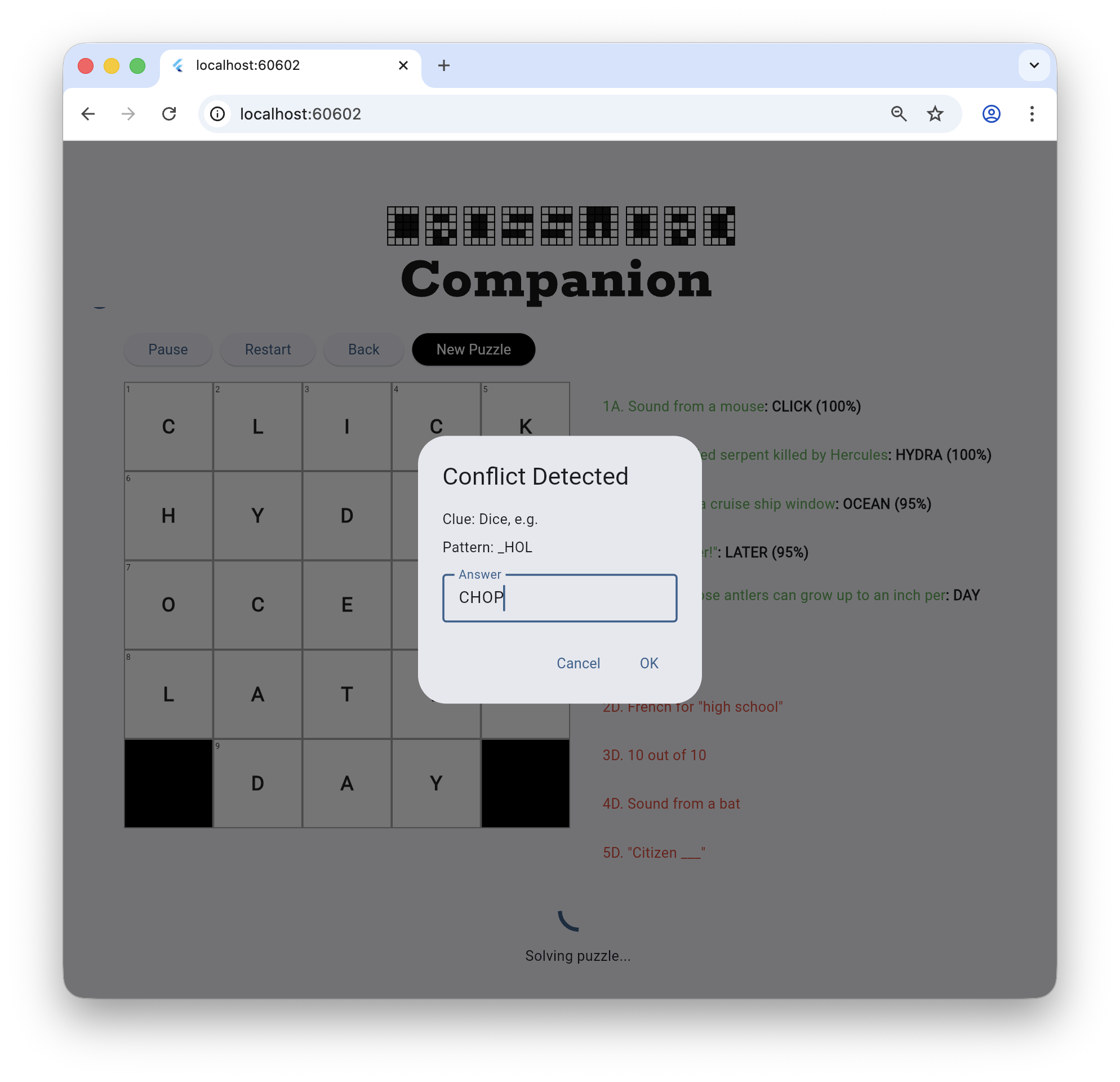
This is called putting the "human in the loop" and it's yet another way for
humans and LLMs to collaborate. Flutter and the Firebase AI Logic SDK make this
easy to do. First, the sample defines a function and configures the model:
// The new function to let the LLM resolve solution conflicts
static final _resolveConflictFunction = FunctionDeclaration(
'resolveConflict',
'Asks the user to resolve a conflict between the letter pattern and the '
'proposed answer. Use this BEFORE calling returnResult if the answer you '
'want to propose does not match the letter pattern.',
parameters: {
'proposedAnswer': Schema(
SchemaType.string,
description: 'The answer the LLM wants to suggest.',
),
'pattern': Schema(
SchemaType.string,
description: 'The current letter pattern from the grid.',
),
'clue': Schema(SchemaType.string, description: 'The clue text.'),
},
);
// Pass the new tool to the model for solving clues.
final _clueSolverModel = FirebaseAI.googleAI().generativeModel(
model: 'gemini-2.5-flash',
systemInstruction: Content.text(clueSolverSystemInstruction),
tools: [
Tool.functionDeclarations([
...
_resolveConflictFunction,
]),
],
);
// Let the LLM know that it has a new tool.
static String get clueSolverSystemInstruction =>
'''
You are an expert crossword puzzle solver.
...
### Tool: `resolveConflict`
You have a tool to ask the user to resolve a conflict.
**When to use:**
- Use this tool **BEFORE** `returnResult` if your proposed answer conflicts with the provided letter pattern.
- For example, if the pattern is `_ R _ Y` and you want to suggest `RENT` (which fits the clue), there is a conflict at the second letter (`R` vs `E`). You should call `resolveConflict(proposedAnswer: "RENT", pattern: "_ R _ Y", clue: "...")`.
- The tool will return the user's decision (either your proposed answer or a new one). You should then use that result to call `returnResult`.
**Function signature:**
```json
${jsonEncode(_resolveConflictFunction.toJson())}
```
''';
Now when the model sees a conflict, it will call the tool:
// handle the LLM's request to resolve the conflict
await _clueSolverModel.generateContentWithFunctions(
prompt: getSolverPrompt(clue, length, pattern),
onFunctionCall: (functionCall) async => switch (functionCall.name) {
...
'resolveConflict' => await _handleResolveConflict(
functionCall.args,
onConflict,
),
},
);
// Show the dialog to gather the user's input
Future<Map<String, dynamic>> _handleResolveConflict(
Map<String, dynamic> args,
Future<String> Function(String clue, String proposedAnswer, String pattern)?
onConflict,
) async {
final proposedAnswer = args['proposedAnswer'] as String;
final pattern = args['pattern'] as String;
final clue = args['clue'] as String;
if (onConflict != null) {
final result = await onConflict(clue, proposedAnswer, pattern);
return {'result': result};
}
return {'result': proposedAnswer};
}
The sample handles the tool with an implementation of the onConflict method
that calls showDialog to gather data from the user. This all happens in the
middle of the agentic loop, but that's OK – the model is not waiting; it's
already sent back its response to the app's initial request. The user can take
their time with the UI while the sample waits on the Future returned
showDialog. When they're done, the model continues where it left off using the
message history and the most recent request, which in this case happens to be
data gathered interactively from the user.
A modal dialog box is a simple way to put the human in the loop but is not the
only way in Flutter to do so. If you'd prefer, an instance of a
Completer lets you set some state in your app that puts it into
"gathering data from the user" mode. When the app has the data, it can call
complete on the Completer and resume the agentic loop.
Or, since you own the agentic loop, you can check for a call to a "special" function that indicates that you need to gather data from the user. This kind of special function is sometimes called an "interrupt" and you "resume" the conversation with the model when you have the data from the user.
Remember that the LLM is stateless. It's not waiting on you, so you can handle the agentic loop in whatever way makes the most sense for your app. You can come back to the LLM with an updated message history and a new prompt at any time, whether it's been a minute or in a month.
Unless stated otherwise, the documentation on this site reflects Flutter 3.41.5. Page last updated on 2026-01-07. View source or report an issue.