Set up your project
Instructions on how to create a new Flutter app.
Preview the Wikipedia reader app you'll build and set up the initial project with required packages.
What you'll accomplish
Steps
1
Introduction
Introduction
In the next few lessons, you'll learn how to work with data in a Flutter app. You'll build an app that fetches and displays article summaries from the Wikipedia API.
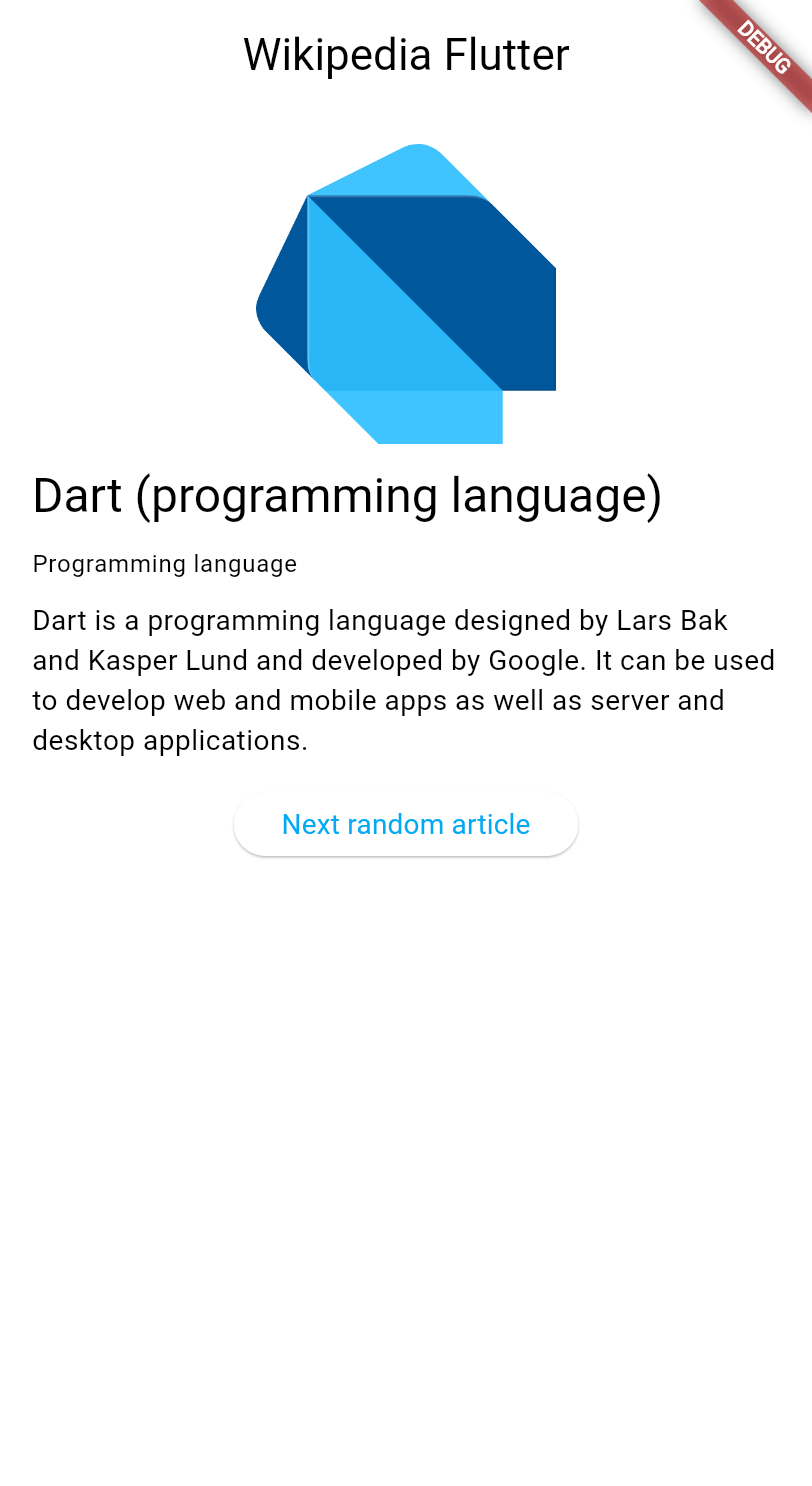
These lessons explore:
- Making HTTP requests in Flutter.
- Managing application state with
ChangeNotifier. - Using the MVVM architecture pattern.
- Creating responsive user interfaces that update automatically when data changes.
This tutorial assumes you've completed the Getting started with Dart and the Introduction to Flutter UI tutorials, and therefore doesn't explain concepts like HTTP, JSON, or widget basics.
2
Create a new Flutter project
Create a new Flutter project
Create a new Flutter project using the Flutter CLI. In your preferred terminal, run the following command to create a minimal Flutter app:
flutter create wikipedia_reader --empty
3
Add required dependencies
Add required dependencies
Your app needs the http package to make HTTP requests.
Add it to your project:
cd wikipedia_reader && flutter pub add http
4
Examine the starter code
Examine the starter code
First, create a new file lib/summary.dart to define the data model
for Wikipedia article summaries. This file has no special logic, and is
simply a collection of classes that represent the data returned by the
Wikipedia API. Its sufficient to copy the code below into the file and then ignore it. If you aren't comfortable basic Dart classes, you should read the
Dart Getting Started tutorial first.
class Summary {
/// Returns a new [Summary] instance.
Summary({
required this.titles,
required this.pageid,
required this.extract,
required this.extractHtml,
required this.lang,
required this.dir,
this.thumbnail,
this.originalImage,
this.url,
this.description,
});
///
TitlesSet titles;
/// The page ID
int pageid;
/// First several sentences of an article in plain text
String extract;
/// First several sentences of an article in simple HTML format
String extractHtml;
ImageFile? thumbnail;
/// Url to the article on Wikipedia
String? url;
///
ImageFile? originalImage;
/// The page language code
String lang;
/// The page language direction code
String dir;
/// Wikidata description for the page
String? description;
bool get hasImage =>
(originalImage != null || thumbnail != null) && preferredSource != null;
String? get preferredSource {
ImageFile? file;
if (originalImage != null) {
file = originalImage;
} else {
file = thumbnail;
}
if (file != null) {
if (acceptableImageFormats.contains(file.extension.toLowerCase())) {
return file.source;
} else {
return null;
}
}
return null;
}
/// Returns a new [Summary] instance
static Summary fromJson(Map<String, Object?> json) {
return switch (json) {
{
'titles': final Map<String, Object?> titles,
'pageid': final int pageid,
'extract': final String extract,
'extract_html': final String extractHtml,
'lang': final String lang,
'dir': final String dir,
'content_urls': {
'desktop': {'page': final String url},
'mobile': {'page': String _},
},
'description': final String description,
'thumbnail': final Map<String, Object?> thumbnail,
'originalimage': final Map<String, Object?> originalImage,
} =>
Summary(
titles: TitlesSet.fromJson(titles),
pageid: pageid,
extract: extract,
extractHtml: extractHtml,
thumbnail: ImageFile.fromJson(thumbnail),
originalImage: ImageFile.fromJson(originalImage),
lang: lang,
dir: dir,
url: url,
description: description,
),
{
'titles': final Map<String, Object?> titles,
'pageid': final int pageid,
'extract': final String extract,
'extract_html': final String extractHtml,
'lang': final String lang,
'dir': final String dir,
'thumbnail': final Map<String, Object?> thumbnail,
'originalimage': final Map<String, Object?> originalImage,
'content_urls': {
'desktop': {'page': final String url},
'mobile': {'page': String _},
},
} =>
Summary(
titles: TitlesSet.fromJson(titles),
pageid: pageid,
extract: extract,
extractHtml: extractHtml,
thumbnail: ImageFile.fromJson(thumbnail),
originalImage: ImageFile.fromJson(originalImage),
lang: lang,
dir: dir,
url: url,
),
{
'titles': final Map<String, Object?> titles,
'pageid': final int pageid,
'extract': final String extract,
'extract_html': final String extractHtml,
'lang': final String lang,
'dir': final String dir,
'description': final String description,
'content_urls': {
'desktop': {'page': final String url},
'mobile': {'page': String _},
},
} =>
Summary(
titles: TitlesSet.fromJson(titles),
pageid: pageid,
extract: extract,
extractHtml: extractHtml,
lang: lang,
dir: dir,
description: description,
url: url,
),
{
'titles': final Map<String, Object?> titles,
'pageid': final int pageid,
'extract': final String extract,
'extract_html': final String extractHtml,
'lang': final String lang,
'dir': final String dir,
'content_urls': {
'desktop': {'page': final String url},
'mobile': {'page': String _},
},
} =>
Summary(
titles: TitlesSet.fromJson(titles),
pageid: pageid,
extract: extract,
extractHtml: extractHtml,
lang: lang,
dir: dir,
url: url,
),
_ => throw FormatException('Could not deserialize Summary, json=$json'),
};
}
@override
String toString() =>
'Summary['
'titles=$titles, '
'pageid=$pageid, '
'extract=$extract, '
'extractHtml=$extractHtml, '
'thumbnail=${thumbnail ?? 'null'}, '
'originalImage=${originalImage ?? 'null'}, '
'lang=$lang, '
'dir=$dir, '
'description=$description'
']';
}
// Image path and size, but doesn't contain any Wikipedia descriptions.
///
/// For images with metadata, see [WikipediaImage]
class ImageFile {
/// Returns a new [ImageFile] instance.
ImageFile({required this.source, required this.width, required this.height});
/// Original image URI
String source;
/// Original image width
int width;
/// Original image height
int height;
String get extension {
final extension = getFileExtension(source);
// by default, return a non-viable image extension
return extension ?? 'err';
}
Map<String, Object?> toJson() {
return <String, Object?>{
'source': source,
'width': width,
'height': height,
};
}
/// Returns a new [ImageFile] instance
// ignore: prefer_constructors_over_static_methods
static ImageFile fromJson(Map<String, Object?> json) {
if (json case {
'source': final String source,
'height': final int height,
'width': final int width,
}) {
return ImageFile(source: source, width: width, height: height);
}
throw FormatException('Could not deserialize OriginalImage, json=$json');
}
@override
String toString() =>
'OriginalImage[source_=$source, width=$width, height=$height]';
}
class TitlesSet {
/// Returns a new [TitlesSet] instance.
TitlesSet({
required this.canonical,
required this.normalized,
required this.display,
});
/// the DB key (non-prefixed), e.g. may have _ instead of spaces,
/// best for making request URIs, still requires Percent-encoding
String canonical;
/// the normalized title (https://www.mediawiki.org/wiki/API:Query#Example_2:_Title_normalization),
/// e.g. may have spaces instead of _
String normalized;
/// the title as it should be displayed to the user
String display;
/// Returns a new [TitlesSet] instance and imports its values from a JSON map
static TitlesSet fromJson(Map<String, Object?> json) {
if (json case {
'canonical': final String canonical,
'normalized': final String normalized,
'display': final String display,
}) {
return TitlesSet(
canonical: canonical,
normalized: normalized,
display: display,
);
}
throw FormatException('Could not deserialize TitleSet, json=$json');
}
@override
String toString() =>
'TitlesSet['
'canonical=$canonical, '
'normalized=$normalized, '
'display=$display'
']';
}
String? getFileExtension(String file) {
final segments = file.split('.');
if (segments.isNotEmpty) return segments.last;
return null;
}
const acceptableImageFormats = ['png', 'jpg', 'jpeg'];
Then, open lib/main.dart and replace the existing code with
this basic structure, which adds required imports that the app uses:
import 'dart:convert';
import 'dart:io';
import 'package:flutter/material.dart';
import 'package:http/http.dart';
import 'summary.dart';
void main() {
runApp(const MainApp());
}
class MainApp extends StatelessWidget {
const MainApp({super.key});
@override
Widget build(BuildContext context) {
return MaterialApp(
home: Scaffold(
appBar: AppBar(
title: const Text('Wikipedia Flutter'),
),
body: const Center(
child: Text('Loading...'),
),
),
);
}
}
This code provides a basic app structure with a title bar and placeholder content. The imports at the top include everything you need for HTTP requests, JSON parsing, and the Wikipedia data model.
5
Run your app
Run your app
Test that everything works by running your app:
flutter run -d chrome
You should see a simple app with "Wikipedia Flutter" in the app bar and "Loading..." in the center of the screen.
6
Review
Review
What you accomplished
Here's a summary of what you built and learned in this lesson.Previewed the Wikipedia reader app
You're starting a new tutorial section focused on working with data. You'll learn HTTP requests, state management with
ChangeNotifier, and the MVVM architectural pattern.
Added the http package and created a data model
You used flutter pub add to install the http package for making HTTP requests and created the
Summary class for Wikipedia data. Packages let you leverage existing code built by the community instead of building everything from scratch.
Set up the initial project structure
Your app has the basic structure with all necessary imports for HTTP requests, JSON parsing, and Wikipedia data. You're ready to start fetching real data from the Wikipedia API!
7
Test yourself
Test yourself
Project Setup Quiz
1 / 2-
Creates a project with no files at all.
Not quite
The project still has essential files; it just uses a minimal template.
-
Creates a minimal Flutter project with less boilerplate code.
That's right!
The `--empty` flag generates a minimal starter template without the default counter app.
-
Creates a project that can only run on web.
Not quite
The flag doesn't restrict platforms; it only affects the starter template.
-
Creates a project without any dependencies.
Not quite
The project still includes core Flutter dependencies.
-
`flutter package install [package_name]`
Not quite
There is no `flutter package` command; use `flutter pub add`.
-
`flutter pub add [package_name]`
That's right!
Running `flutter pub add` adds the package to pubspec.yaml and downloads it.
-
`dart get [package_name]`
Not quite
The command for adding packages is `flutter pub add` or editing pubspec.yaml.
-
`flutter install [package_name]`
Not quite
The correct command uses `pub add`, not `install`.
Unless stated otherwise, the documentation on this site reflects Flutter 3.41.5. Page last updated on 2026-03-09. View source or report an issue.